P
Cineprompt

Best practices

  • -Use the tag as the style lock and repeat it across the shot list.
  • -Keep each shot to one action for stable motion.
  • -Add a short camera cue to control framing.

Failures & fixes

  • -If the style is inconsistent, restate the tag in every shot.
  • -If motion feels noisy, simplify the action.
  • -If lighting shifts, add a single lighting cue and repeat it.

#handheld prompts by model

Sora 2 version
Shot → Framing → DOF → Action → Lighting → Duration
Shot 1: climber on snowy ridge, whiteout storm, blowing snow, handheld documentary. Framing: wide, subject small. Depth of field: shallow. Camera: handheld wide. Lighting: flat overcast. Duration: 4s.
Veo 3.1 version
Scene → Camera → Transition → Audio → Lighting
Scene: climber on snowy ridge, whiteout storm, blowing snow, handheld documentary. Camera choreography: handheld wide. Transition: cut. Audio cues: howling wind. Lighting: flat overcast.
Kling 2.6 version
Scene → Action → Motion → Style → Parameters
Scene: climber on snowy ridge, whiteout storm, blowing snow, handheld documentary. Motion: handheld wide. Style: cold desaturated palette, heavy snow, handheld grit. Parameters: quality=high, frame_rate=24fps, noise=low. Input image: reference frame.
Seedream 4.5 version
Subject → Composition → Lighting → Style → Mood
Subject: climber on snowy ridge, whiteout storm, blowing snow, handheld documentary. Composition: wide, subject small. Lighting: flat overcast. Style: cold desaturated palette, heavy snow, handheld grit. Mood: documentary, cinematic, handheld.

#handheld prompt patterns

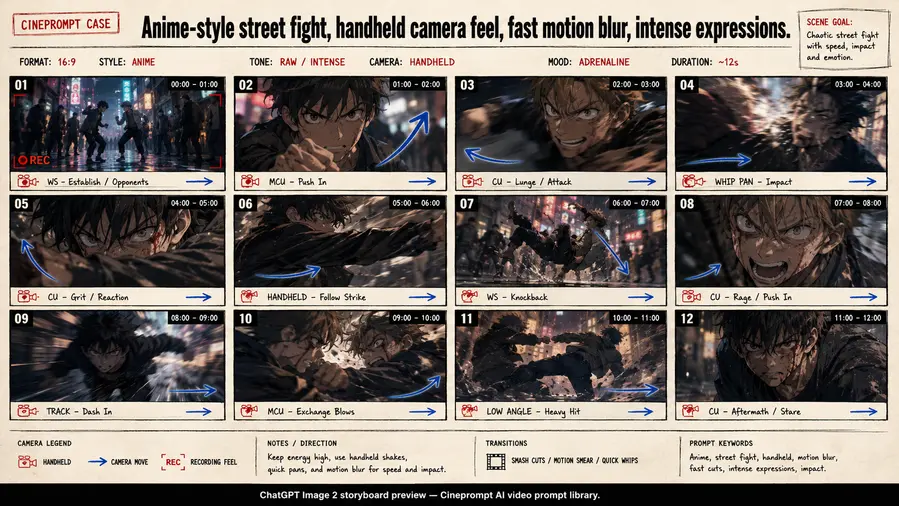
A tag page is the fastest way to find a consistent look. Each prompt here repeats the #handheld cue across shots so the model does not drift. That is the core of a reliable ai video generator prompt: a stable style anchor plus a clear action beat per shot.

Use the model variants section to translate the same idea for Sora, Veo, Kling, and Seedream. This keeps your prompt pack reusable and helps you build a repeatable ai video generator prompts workflow for the #handheld style.

When you remix, keep the tag as the style lock in every shot. This is the simplest way to keep a consistent ai video generator prompt while you change subjects, locations, or pacing.
FAQ

What is a handheld video prompt?
A handheld prompt uses style cues and camera language that match the handheld tone while keeping actions short and clear.
How do I keep the style consistent?
Repeat the same style lock and lighting cues in each shot.